


Articles
Read our latest articles and connect with us on Linkedin to know better how Blyx features are.
Home → Resources → Articles

OUR ARTICLES
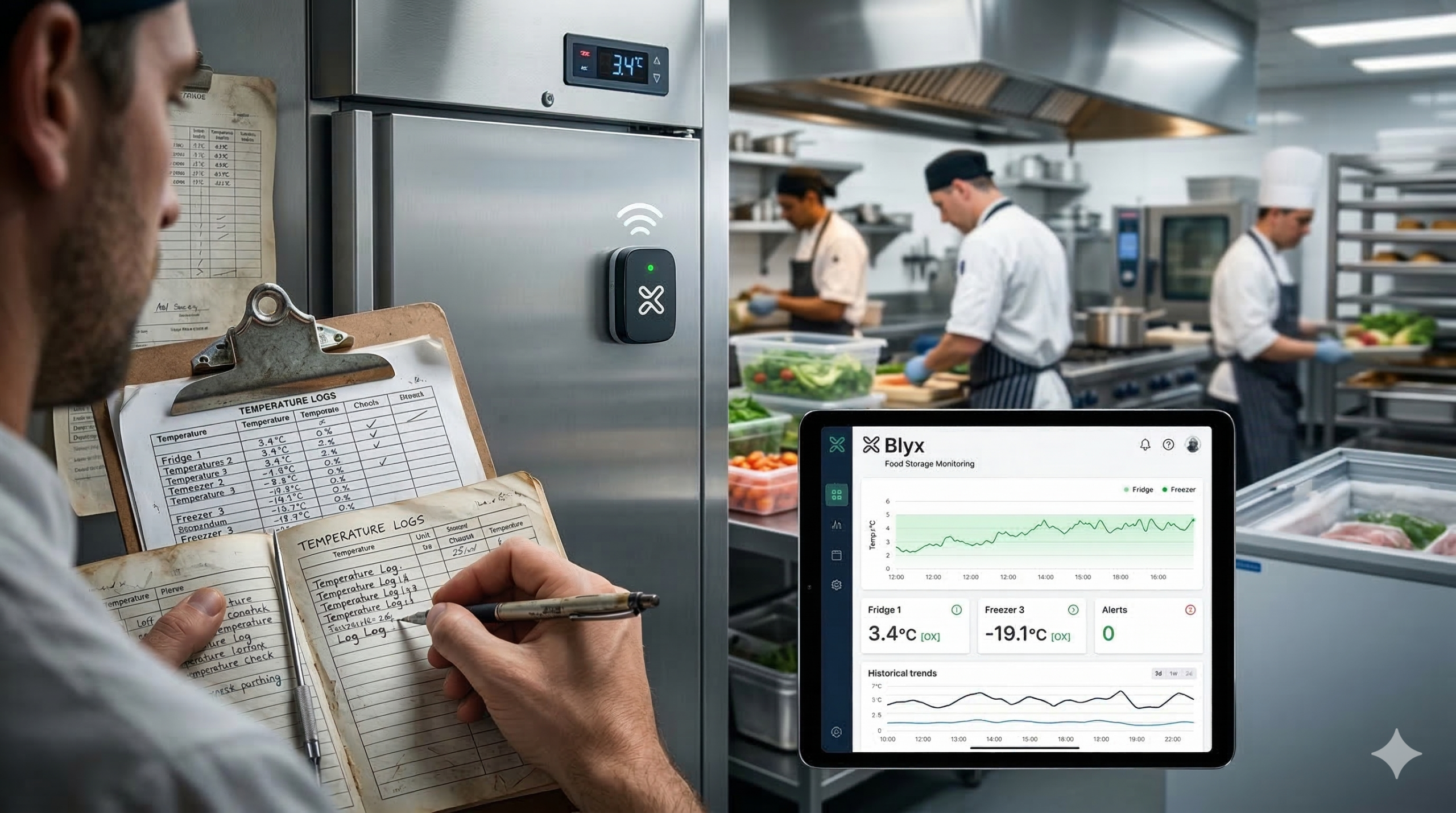
Fridge Temperature Data
Most accommodation facilities check food storage temperatures during scheduled inspections.
But what happens between those checks?
Temperature fluctuations, power interruptions, or equipment issues can occur without anyone noticing — until food has already been compromised.
We’ve just published a short article looking at how continuous monitoring can help FIFO facilities better understand and manage food storage conditions.
Monitoring Food Storage Performance
Are We Monitoring Food Storage the Best Way?
Food storage and management is a critical responsibility in FIFO accommodation facilities.
When something goes wrong, the consequences can be significant. Replacing damaged food in remote locations can be difficult and expensive. More importantly, improper food storage can create serious health risks if food safety standards are not maintained.
Most facilities already have processes in place to monitor food storage temperatures. But the question is:
Are we collecting the right information — and is it being used effectively?
The Limitations of Traditional Monitoring
In many food service areas, refrigerators and storage equipment display their temperature on a small screen. This works well — as long as someone notices when something is wrong.
The reality is that temperatures can fluctuate throughout the day, often without being noticed by the people working around the equipment.
To support food safety compliance, staff typically perform manual checks using temperature probes or infrared guns. These readings are then recorded on paper logs.
While this process meets compliance requirements, it also introduces several challenges:
- Readings are only taken at specific moments in time
- Different staff members may record the data
- The data is often written down quickly during busy shifts
- Once recorded in a book, the information is rarely analysed further
The process works — until something goes wrong.
When a temperature issue occurs, investigating what happened can become difficult. Paper logs provide only snapshots in time, making it hard to understand what the temperature was doing between checks.
Improving the Process with Better Data
This is where technology can help improve the quality of the information being collected.
Blyx can introduce simple temperature monitoring sensors into food storage equipment such as refrigerators, freezers, and cold rooms. These sensors record temperature readings at consistent intervals, creating a much clearer picture of how the equipment is performing throughout the day.
Instead of relying on occasional manual readings, facilities gain continuous data showing how temperature behaves over time.
This provides several advantages:
- No gaps in the data
- Clear historical records for compliance and investigation
- Early identification of abnormal temperature behaviour
- Better understanding of how equipment is performing
Most importantly, the data is stored digitally, allowing it to be visualised and analysed rather than sitting unused in a logbook.
Faster Response to Potential Issues
Another key benefit is the ability to respond quickly when something abnormal occurs.
The Blyx system can trigger alerts when temperatures move outside the acceptable range. These notifications allow staff to investigate the issue immediately, reducing the risk of food spoilage or safety concerns.
Often temperature fluctuations are temporary and not a cause for concern. However, if abnormal behaviour begins occurring frequently or for extended periods, it can indicate a developing issue with the equipment.
With clear historical data, facilities can identify these patterns early and take action before a problem escalates.
Supporting Staff, Not Replacing the Process
Importantly, Blyx does not need to replace existing food safety processes.
Staff can still perform their routine checks as required. However, instead of manually recording temperature readings, they can simply confirm through the system that the monitored temperatures are within the acceptable range.
This approach improves the process in two ways:
- It ensures continuous temperature monitoring is always occurring
- It confirms that staff checks are still being completed
The system supports the team rather than adding additional workload.
Putting Data Into Context
Collecting data is important — but making that data useful is even more valuable.
When information is written in a logbook, it rarely goes beyond that point. It becomes difficult to analyse trends or identify when data stops being recorded altogether.
Digital monitoring allows the data to be presented in dashboards and reports where patterns can be identified and decisions can be made with confidence.
For example, temperature data may reveal issues that would otherwise go unnoticed, such as:
- A refrigerator cycling into defrost mode incorrectly
- Temperature instability following a power outage
- Equipment slowly losing performance over time
These types of issues are difficult to detect with occasional manual checks but become much clearer when continuous data is available.
Monitoring Through Power Interruptions
Power outages can create additional uncertainty for food storage.
When power is restored, it can be difficult to determine what happened to the temperature inside the fridge or freezer during the outage and whether the stored food remains safe.
Blyx monitoring devices can continue recording environmental conditions independently, ensuring facilities have reliable information to assess the impact of an outage and make informed decisions about food safety.
Better Data. Better Decisions.
Food safety in accommodation facilities depends on reliable processes and accurate information.
By introducing simple temperature monitoring and digital data collection, Blyx helps facilities improve the visibility of their food storage operations without overcomplicating the workflow for staff.
The goal isn’t to replace the process — it’s to improve the quality of the information that supports it.
Because when the right data is available, in the right format, at the right time, facilities can make better decisions that protect both their guests and their operations.
Mapping the Path
Unlock your door.
See when your room is scheduled for cleaning.
Submit a maintenance request — and track how it’s progressing.
Blyx brings better communication between guests and facility staff.
Now information can be shared easily, reducing questions, confusion, and delays.
Because when guests know what’s happening, everything runs smoother.
Mapping the Path: Smarter Security Rounds with Blyx
How Blyx Brings Transparency to Facility Rounds
In many facilities, security, maintenance and housekeeping teams spend their shifts moving through buildings and grounds — checking rooms, inspecting common areas, and responding to issues. These rounds are essential for safety, comfort, and operational efficiency, but they often rely on manual reporting and handwritten logs to confirm where teams have been and when.
What if that same information could be automatically captured, mapped, and made instantly visible — without adding more work for staff?
That’s exactly what Blyx can do.
Smarter Security Tracking
Security teams play a vital role in keeping facilities safe — conducting regular patrols, checking doors, and responding to incidents as they happen. But confirming when and where those checks occurred has traditionally relied on manual logs or end-of-shift reports.
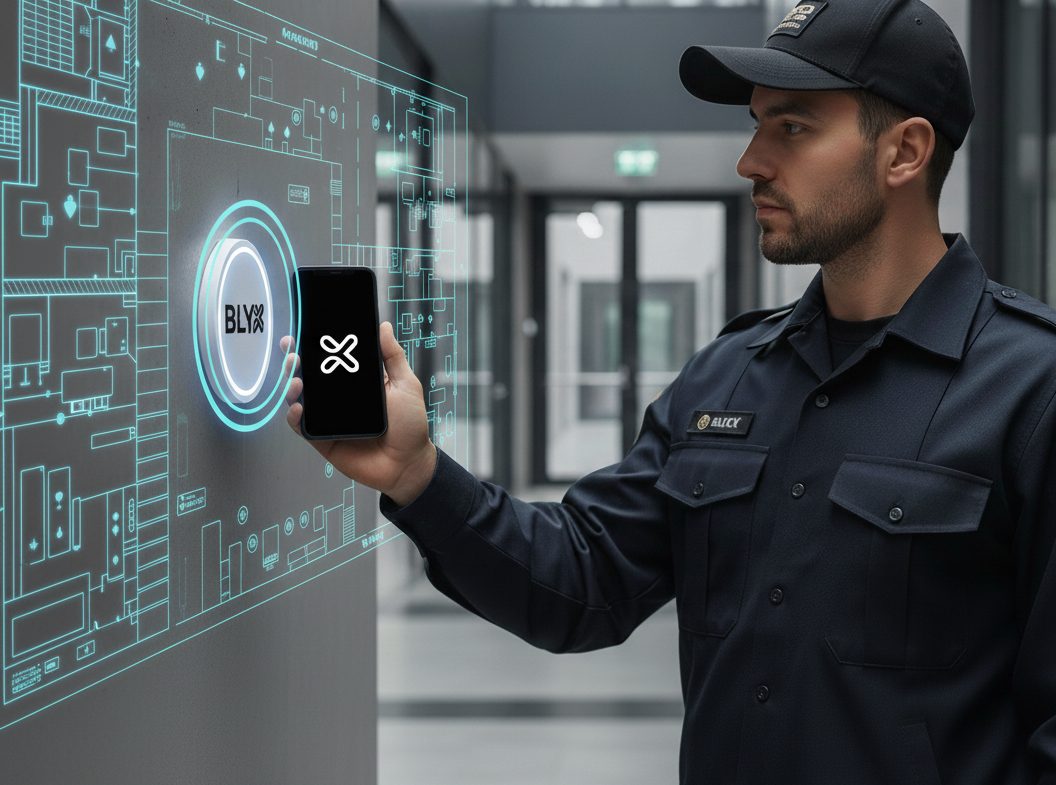
With the Blyx Access Control infrastructure, that process becomes smarter, faster, and more transparent. Facilities can install simple NFC checkpoints throughout key patrol areas, allowing security officers to use the Blyx App to tap each point as they complete their rounds.
Each tap securely records the officer’s code, location, date, and time, sending it directly to the Blyx system. The data then appears on the Blyx Live Facility Map, providing a clear visual record of where patrols have been completed and when. Because NFC tokens don’t require power, facilities can install as many as needed — indoors, outdoors, or in remote areas — without worrying about maintenance or charging.
The same system also improves accuracy during incidents. If a security team member carries a Blyx RFID tag, they can simply tap any nearby Blyx Reader to instantly log their position and time. This creates a verifiable, timestamped record that can be used for reports or to quickly locate relevant CCTV footage later.
It’s a simple, integrated way to add transparency and confidence to every patrol. No extra steps. No extra tools. Just better, more reliable information — all captured automatically through the Blyx system.
Efficiency Beyond Security
These same features extend to other facility teams too.
Maintenance, operations, and housekeeping staff can use their Blyx access activity to understand the paths they take each day — revealing opportunities to streamline routes, balance workloads, or identify areas that need more attention.
When these paths are visualised on the Live Facility Map, they turn routine movement into actionable insights.
Seeing More with the Data You Already Have
Blyx doesn’t just capture access data — it gives it context.
By overlaying real movement and event data on the facility map, managers gain a clearer picture of what’s really happening across their sites, in real time.
You can’t be everywhere at once, but with Blyx, you can see further — and make smarter decisions from the information you already have.
Swipe to Send Information, Not Just Open Doors
Unlock your door.
See when your room is scheduled for cleaning.
Submit a maintenance request — and track how it’s progressing.
Blyx brings better communication between guests and facility staff.
Now information can be shared easily, reducing questions, confusion, and delays.
Because when guests know what’s happening, everything runs smoother.
Swipe to Send Information, Not Just Open Doors
Smarter Operations Don’t Always Need More Devices
In many accommodation facilities today, the push to collect better operational data has led to an increase in devices being introduced across the site. Tablets are often issued to staff so they can update job status, report maintenance issues, or confirm completed work.
In theory, this improves visibility. In reality, it can introduce new challenges.
Devices need to be charged, monitored, maintained, and replaced when damaged. They can slow staff down if they are complicated to use, and in busy environments they can easily be misplaced or forgotten.
Sometimes improving operational insight isn’t about adding more technology — it’s about using the systems you already have more intelligently.
That’s exactly the thinking behind the Blyx ecosystem.
Improving the Existing Process
Let’s take a simple example: room maintenance and housekeeping in FIFO accommodation.
The typical process is familiar.
Rooms are flagged for cleaning either because a guest has changed or because the same person has occupied the room for a number of days. A housekeeping supervisor prepares a list of rooms for the team, often noting whether the room requires a full clean or a mid-swing clean. They may also indicate which rooms have arrivals that day so staff can prioritise their work.
Staff then collect a master key and begin their cleaning run.
The process works, but it also leaves gaps in visibility for management and introduces unnecessary security risks with shared master keys.
Removing the Master Key
With Blyx, the master key is no longer required.
Room allocations can simply be uploaded as a roster, allowing the system to grant access to the specific rooms assigned to each staff member. Their access card will only open the rooms they are responsible for.
To make things even clearer for staff, a colour can be assigned to that roster. When the staff member arrives at the correct room, the RFID reader will display their designated colour, providing a simple visual confirmation that they are at the right location.
This improves both security and operational clarity without adding complexity.
Understanding What Is Happening in Real Time
While staff are completing their tasks, Blyx can record where their access card has been presented. Combined with door open and close events, the system can estimate how long a staff member has spent inside each room.
For many facilities this information alone is enough to confirm that the clean has likely been completed.
But Blyx prefers not to rely on assumptions when a better option exists.
Communicating Task Status Without Extra Devices
Traditionally, once a cleaning run is complete the staff member returns their checklist to the office. That sheet of paper confirms whether rooms were cleaned, skipped, or if maintenance issues were discovered.
Managers sometimes need this information earlier, which is why many facilities introduce tablets so staff can update the system in real time.
Blyx offers another option.
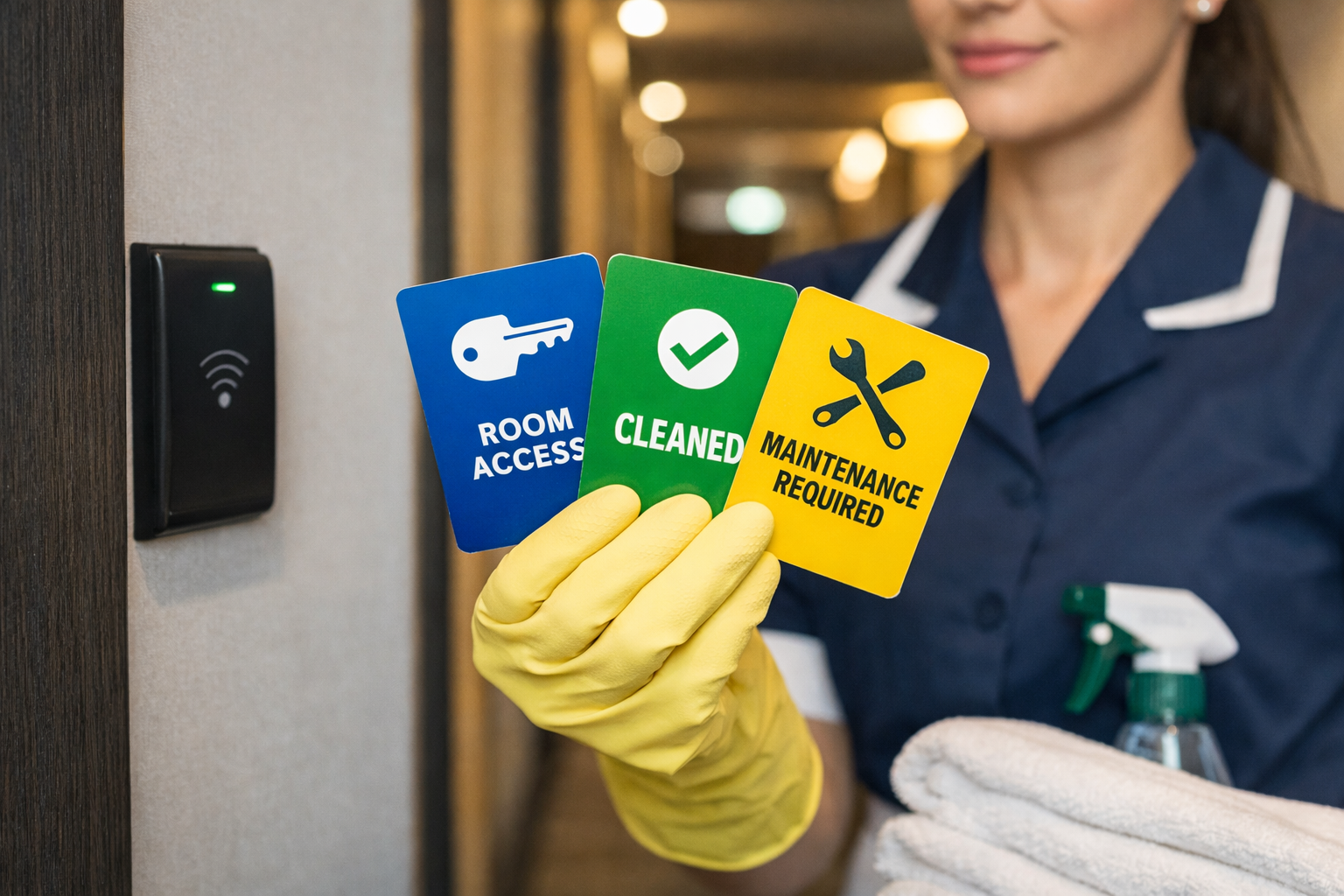
Instead of introducing additional devices, staff can simply carry a small set of RFID cards that communicate status updates back to the system.
Each card contains a unique access code that does not open doors, but instead sends a specific message to the Blyx platform when presented to the reader.
For example:
- Clean completed
- Maintenance required
- Unable to complete clean
- Room currently occupied
When the card is presented at the room’s reader, the system updates the room status automatically.
Management can then see the live progress of housekeeping directly on the Blyx Dashboard.
Simpler for Staff. Better Visibility for Management.
This approach removes the need for additional tablets or handheld devices while still providing the operational data facilities need.
Staff simply carry a small set of clearly labelled cards. When they finish a task, they swipe the appropriate card and the system updates instantly.
No devices to charge.
No screens to manage.
No extra equipment to replace if damaged.
Just a smarter way of using the infrastructure already in place.
Technology That Works With Operations
Blyx is designed to improve efficiency without overcomplicating the way facilities operate.
Rather than adding layers of technology, the focus is on understanding how a site already functions and identifying simple adjustments that can improve visibility, security, and workflow.
Sometimes the most effective solution isn’t adding more systems — it’s allowing the systems you already have to do more.
That flexibility is what makes the Blyx ecosystem different.

Keeping Guests in the Loop
Unlock your door.
See when your room is scheduled for cleaning.
Submit a maintenance request — and track how it’s progressing.
Blyx brings better communication between guests and facility staff.
Now information can be shared easily, reducing questions, confusion, and delays.
Because when guests know what’s happening, everything runs smoother.
Keeping Guests in the Loop
When Guests Know What’s Happening, Everything Runs Smoother
Most guest frustrations don’t come from what isn’t done — they come from not knowing when something will be done. Whether it’s a room clean or a maintenance request, people just want to know what’s happening and when.
Blyx helps facilities close that communication gap, giving guests visibility and staff the tools to stay organised and efficient.
Housekeeping Runs Smoother When Everyone Knows the Plan
We’re not all angels when it comes to keeping our rooms spotless.
Some people make the bed before their first coffee; others only tidy up when they absolutely have to. But almost everyone agrees — if you know someone’s coming to clean your room, you’d at least do them the courtesy of a quick tidy-up.
On most sites, rooms are cleaned on a set rotation so sheets can be changed and towels replaced. If a room’s too messy, housekeeping might leave a note and return another day. The problem is, guests rarely know when that clean is scheduled — so everyone ends up frustrated.
Blyx can help bridge that gap.
Cleaning rosters can be uploaded into the Blyx system, which then notifies guests when their room is scheduled for cleaning. This small change can make a big difference — fewer calls to reception asking when housekeeping will arrive, and fewer missed cleans because the guest didn’t know when to expect them.
When It Comes to Maintenance, Communication Matters
Maintenance issues are another area where small frustrations can snowball. A leaking tap or a noisy air conditioner isn’t just inconvenient — it’s even more frustrating when you’re not sure if your request was received or when someone will fix it.
With Blyx, guests can log maintenance requests directly through the app — no need to visit reception or fill out a form. The system works with each facility’s existing maintenance process to make sure the request goes exactly where it needs to, right away.
Guests receive confirmation that their request has been logged and scheduled, so they’re not left wondering if it’s been lost in the paperwork. For staff, it means less time re-entering information into multiple systems and more time getting the job done.
Blyx helps streamline communication, speed up responses, and keep everyone informed without adding extra work.
A Simpler Way to Keep Everyone in the Loop
Every site runs differently — that’s why Blyx is built to adapt. The type of information presented and how it’s collected can be customised to suit each facility.
Blyx doesn’t change how you work; it makes it easier to see what’s happening and faster to act when things need attention.
Guests stay informed, staff stay focused, and reception spends less time fielding calls.
It’s better communication, built into the system — a win-win for everyone.

Take away the Temptation
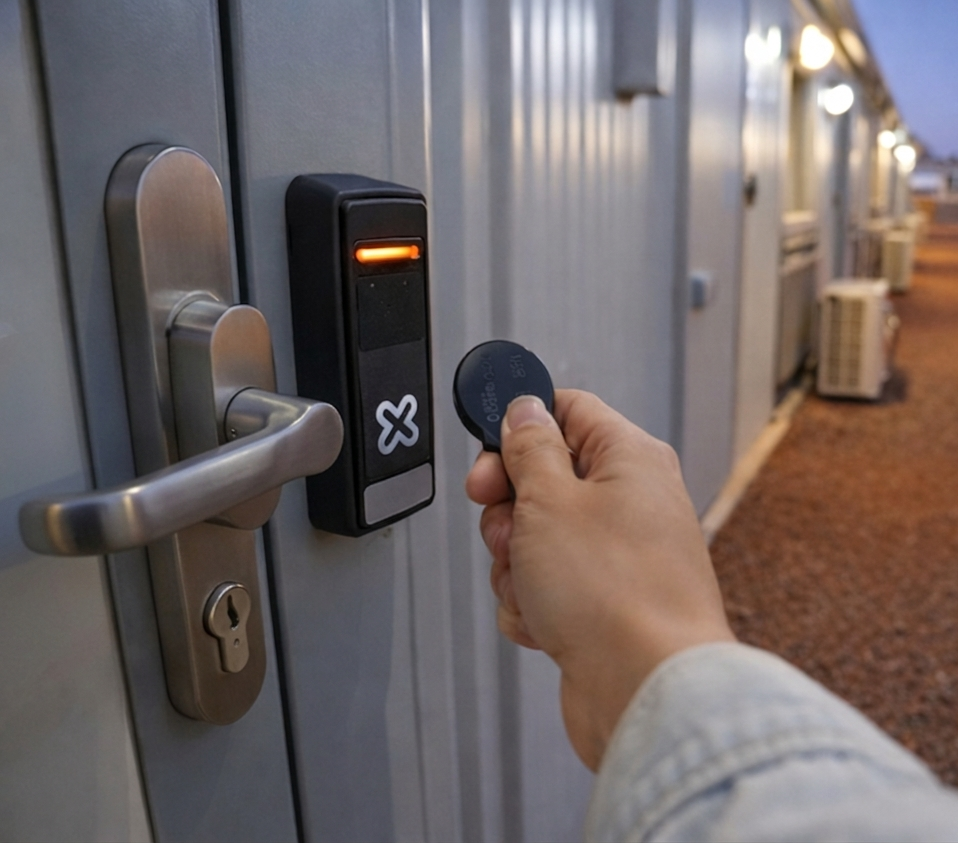
It comes from smarter systems — where access is visible, accountable, and practical in the real world.
Blyx is designed to prioritise electronic access for everyday operations, while keeping physical keys available only when they’re genuinely needed — and fully visible when they are used.
The result isn’t restriction. It’s confidence.
Smarter access, clearer accountability, safer facilities.
Safer Rooms Start with Smarter Access in FIFO Accommodation
Blyx is an electronic access control system designed for remote and FIFO accommodation environments. Day-to-day access is managed digitally — allowing staff access, contractor access, and master access for management without relying on physical keys.
Physical keys are retained only as a last-resort tool, for situations such as offline doors, damaged hardware, or emergency access. This approach reflects the reality of remote sites: access needs to be reliable, flexible, and practical — not idealistic.
What matters is not removing keys entirely, but removing the security risk they traditionally create.
The Challenge with Traditional Keys
In many FIFO villages, physical master keys still represent the highest level of access. While they serve a purpose, they are difficult to track and almost impossible to audit reliably.
Individual room keys can also present a risk. If a room key is lost and the barrel is not replaced, the possibility remains that someone could return and access that room later without the guest or facility knowing.
When key use is largely invisible, the perceived risk of misuse is low. And when risk is low, temptation can exist.
It’s similar to an open cookie jar. If access is easy, untracked, and unlikely to be noticed, some people may be tempted to reach in — not necessarily with bad intent, but because opportunity and low consequence intersect.
Reducing Temptation Through Electronic Access
Blyx shifts everyday access away from keys and into the electronic system.
Staff and contractors are issued electronic credentials with:
- Defined access permissions
- Time and date restrictions
- Automatic expiry when no longer required
Management can hold master-level electronic access without carrying physical keys, ensuring efficiency while maintaining full accountability. Every access event is logged with time and location data, creating clear visibility across the site.
When access is traceable, behaviour changes — and safety improves.
Keeping Keys — Without the Risk
Blyx acknowledges the reality of remote accommodation: physical keys are sometimes necessary.
Instead of eliminating them, Blyx tracks them.
Each key is fitted with a Bluetooth beacon, allowing facilities to:
- Record who has taken responsibility for a key
- Detect where keys move across the site
- Identify when keys are not returned or appear in unexpected locations
This reduces the temptation to misuse keys, because access is no longer invisible.
Immediate Control When a Key Is Compromised
Lost or compromised keys — whether they are room keys or master keys — can create significant security concerns in accommodation facilities.
Blyx pairs key tracking with quick-change barrel technology, enabling facilities to:
- Immediately invalidate a compromised key
- Replace affected barrels in minutes
- Restore secure access without large-scale rekeying programs
For an individual room, this means a lost key can be addressed quickly and confidently. For master keys, which traditionally present the greatest risk, the ability to rapidly replace barrels across multiple rooms removes the long-term security concern that often follows a lost key.
This gives site teams fast, practical control — without disrupting operations.
A Practical Step Toward Safer FIFO Facilities
Blyx is not about surveillance or restricting movement. It is about transparency, accountability, and deterrence.
All access data collected by Blyx is presented in a live operational dashboard, giving site teams real-time visibility across the facility. This includes electronic door access as well as physical keys. If a physical key is in use, operators can see where it is within the facility, where it has been, and — if it is not currently detectable — when and where it was last recorded.
By prioritising electronic access and retaining physical keys only where necessary — and with clear visibility when they are used — Blyx helps FIFO accommodation providers improve safety without making operations harder.
In environments where people live and work side by side, smarter access control and clear data visibility are practical steps toward safer, more trusted facilities.
Prevent Mould Through Dew Point Management
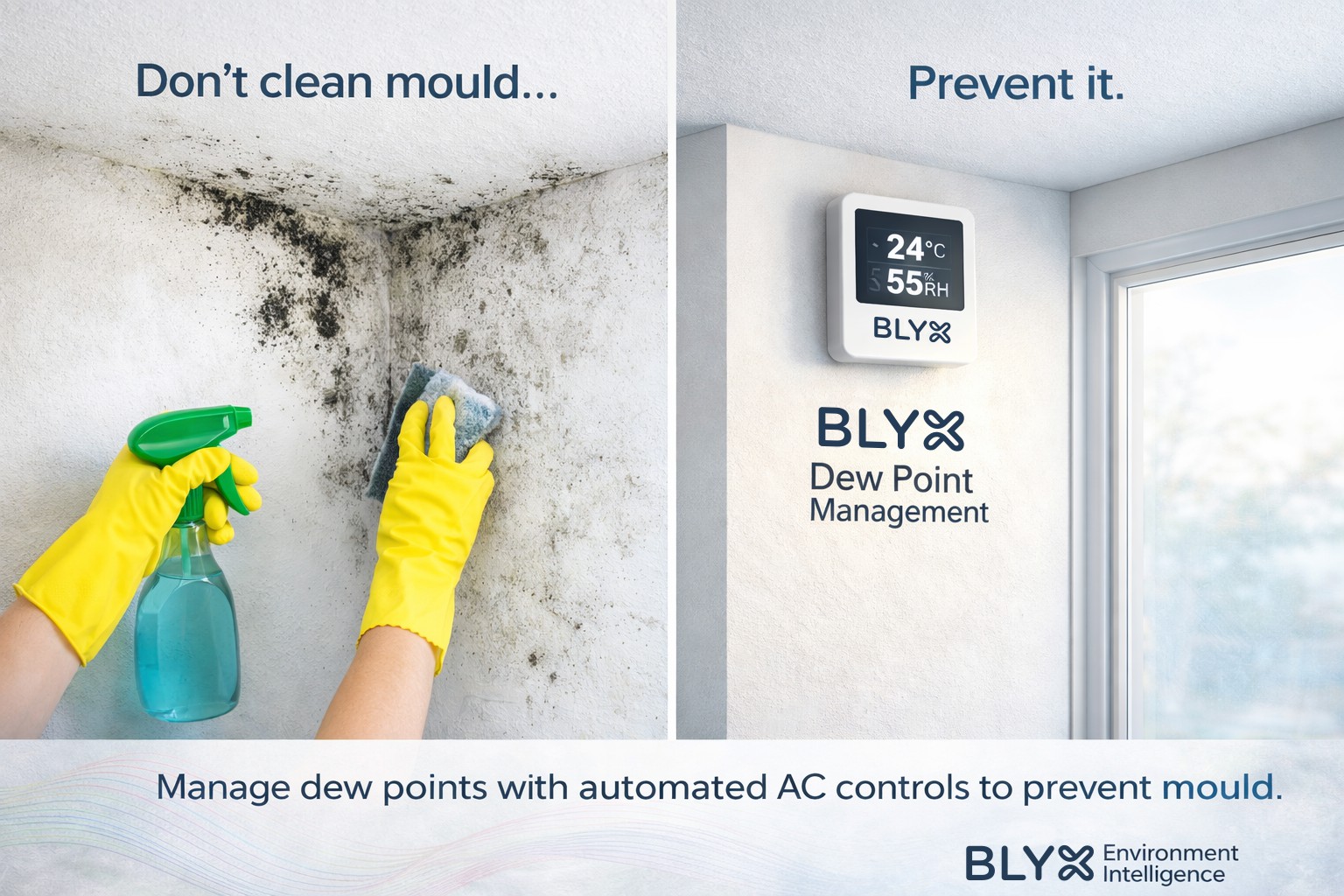
It’s a problem you solve by preventing the conditions that allow it to form.
In hot, humid environments, mould develops when room surfaces fall below the dew point and moisture condenses — often long before it’s visible. Most facilities only discover the issue once damage, disruption, and remediation costs are already in play.
Blyx takes a different approach. By continuously monitoring temperature and humidity, the platform calculates real-time dew point in every room and automatically adjusts air-conditioning to prevent surface condensation from occurring.
The result is proactive mould prevention at the source, not reactive treatment after the fact.
We’ve put together a short article that explains how Blyx uses room data and automation to achieve this.
Dew Point Management
Using Room Intelligence to Prevent Mould Through Dew Point Management
In facilities exposed to extreme weather conditions, mould can be difficult to control and costly to remediate once established. Because mould thrives in environments where moisture condenses on internal surfaces, prevention is far more effective than treatment after growth has occurred.
Blyx is designed to help facilities understand and manage the environmental conditions that lead to mould, with a particular focus on dew point control. Mould does not grow simply because the air is humid; it develops when room surfaces fall below the dew point of the air, allowing moisture to condense. This invisible surface moisture creates the ideal environment for mould spores to activate and spread.
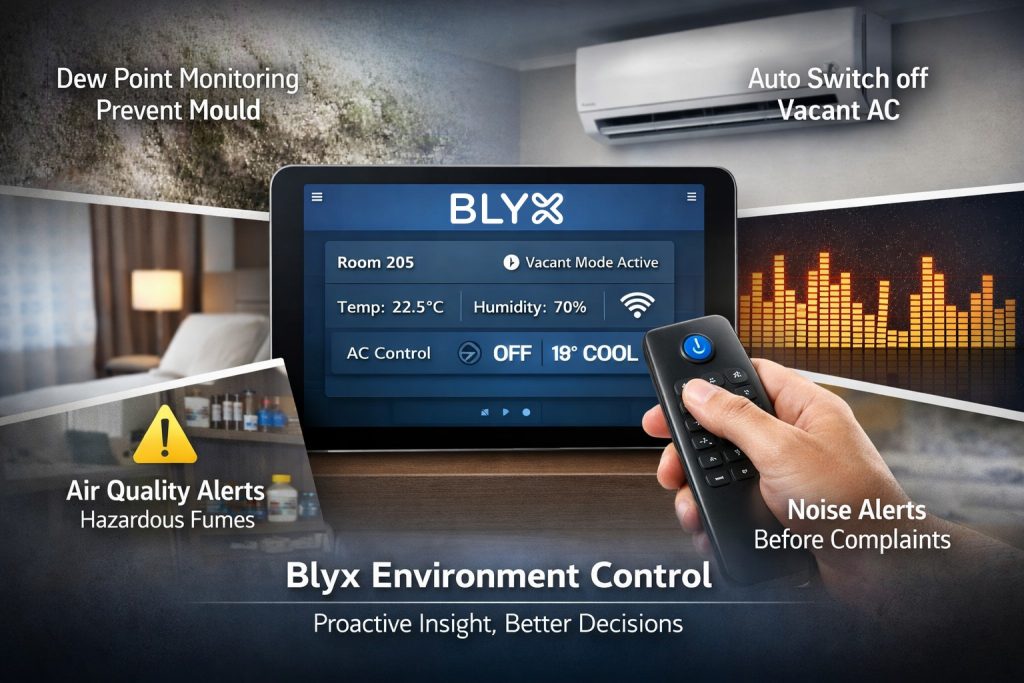
Blyx does not only regulate temperature — it manages the relationship between temperature and humidity. By continuously monitoring both, the system can calculate the dew point in real time and automatically adjust air-conditioning operation to prevent internal surfaces from dropping below this threshold. This removes the root cause of mould formation by preventing condensation, rather than reacting once visible growth has already occurred.
Each Blyx Environment Controller monitors temperature and relative humidity at five-minute intervals, 24 hours a day. Over time, this creates a detailed profile of normal room behaviour, taking into account external weather conditions and typical occupancy patterns. When combined with reservation data and real-time human presence detection, the platform can determine whether a room is occupied, expected to be occupied, or vacant, and apply the most appropriate environmental control strategy.
This intelligence allows Blyx to identify conditions that may indicate emerging issues, such as:
- Prolonged high humidity when a room is unoccupied
- Over-cooling that may drive surfaces below the dew point
- Abnormal moisture patterns that could indicate ventilation or extraction faults
For example, poorly performing bathroom extraction fans can allow moisture to accumulate, significantly increasing mould risk. By analysing humidity decay rates after shower use and comparing them to normal room behaviour, Blyx can flag potential ventilation issues for maintenance attention before mould develops.
In addition to temperature and humidity, the Environment Controller also monitors light levels at the same five-minute intervals. This data can support:
- Assessment of blackout performance for night-shift accommodation
- Detection of lights left on in vacant rooms, contributing to energy waste
The controller also supports optional expansion modules, including:
- Human presence detection
- Infrared control for air-conditioning and televisions
- Acoustic monitoring
- Air quality sensing, including CO₂, VOCs, and selected chemical fumes
Together, these capabilities allow Blyx to build a comprehensive digital model of each room’s environmental behaviour. This not only improves guest comfort and safety, but enables early identification of abnormal conditions, proactive maintenance, and automated control strategies that reduce both operational risk and long-term asset degradation.
By turning continuous room data into actionable insight and automated response, Blyx helps facilities move from reactive mould treatment to proactive dew point and moisture management — preventing the conditions that allow mould to form in the first place.
More about the Blyx Environment Controller
support & onboarding
Real people, real support.
SUPPORT &
ONBOARDING
Real People, Real Support.
At Blyx, everything we do is built around making life easier - and creating real savings in time, labour, efficiency, and money. This isn’t just another system to bolt on; it’s a platform designed to fit into your world, improve how you operate, and support your team every step of the way.